
Technical Sharing - About AIGC Pre-image Generation
Foreword
When using AIGC tools to generate videos, there are generally four scenarios: 1. Text-to-video; 2. Image-to-video; 3. Video redrawing; 4. Composite generation (comprehensive reference).
Among these, the three most frequently used methods all involve static image assets, and the quality of these assets often has a decisive impact on the generation results.
Therefore, in my workflow, I tend to use the more powerful image generation models available on the market for the pre-generation of images. As of this writing, that model is undoubtedly Nano-Banana2; in practice, I prefer to use it via ComfyUI connected to an API, by controllingJson parameters + modifying prompts to achieve precise batch generation of reference images.
(Json can be understood as a pre-prompt, a prerequisite condition that AI adds to all its output. For example, if you want to modify the background of an image, you can hardcode in the Json to only modify the background, so no matter what other prompts are written, the AI will only modify the image background.)
Regarding Json, when I need to generate images in batches, I will fill in the output resolution and the work content to be completed (such as coloring white models, style transfer, etc.). When I usually only need one or a few images, I tend to use pre-written Json code, which usually uses looser constraints, giving the AI more room for free play, which occasionally brings pleasant surprises.
Image Generation Tools
I generally use three generation tools depending on the actual situation: 1. Gemini Official Website; 2. CherryStudio; 3.ComfyUI;
- The official Gemini is the most friendly for tasks requiring repeated image modifications with context, it is also faster than the API, and it's free.
- I use CherryStudio more to meet my needs for quickly generating an image, because it is a desktop software. I can open it quickly, start inputting prompts directly, and get an image output.
- ComfyUI is the best choice for assembly line work. I have pre-written multiple workflows and Json setups for it to handle situations requiring mass image generation and iterative selection. I can let it generate hundreds of images in batches under unattended supervision for me to pick from. It also grants me great freedom to customize workflows based on project needs. A typical application scenario is the production of 3D mapping; due to the specificity requiring a fixed canvas, I can implement 100% content alignment through code in the Json, without needing to repeat my requirements in every natural language prompt.
ComfyUI Workflow
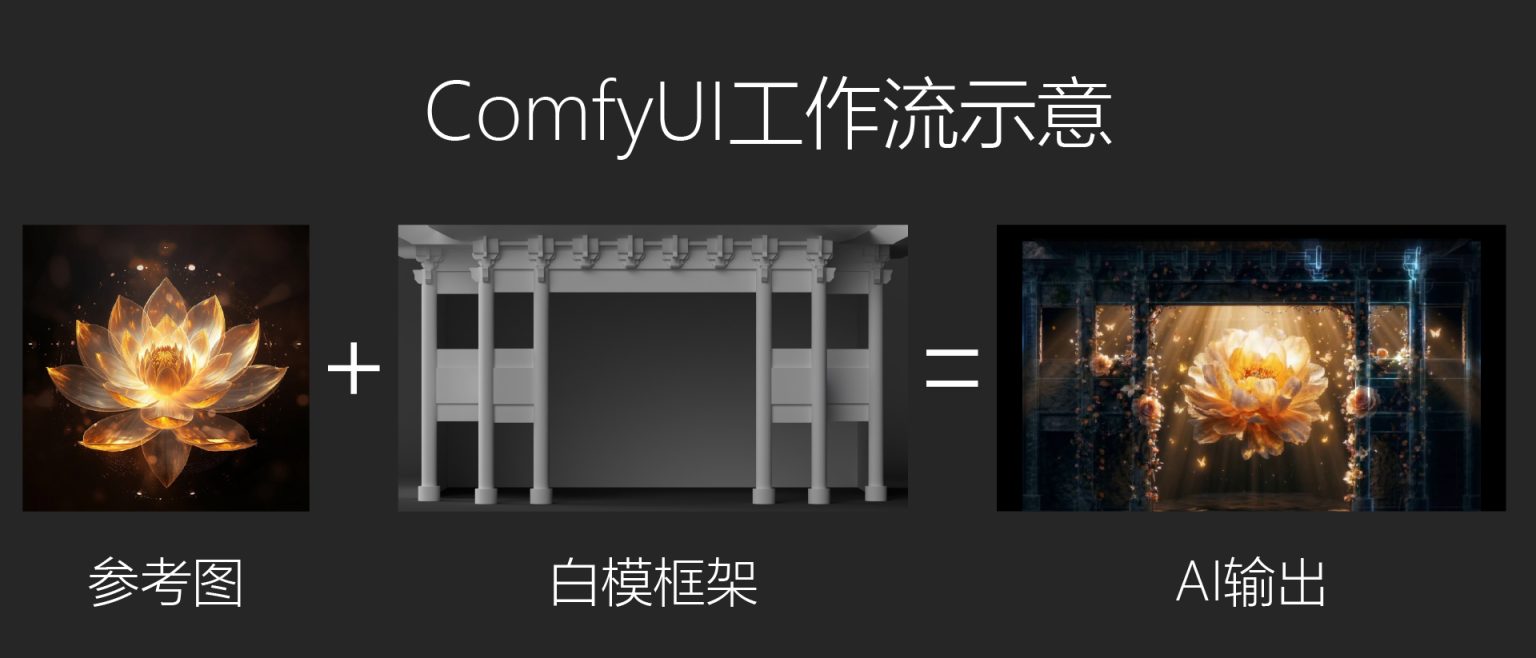
In this technical sharing article, I will illustrate with a double-image white model rendering workflow.
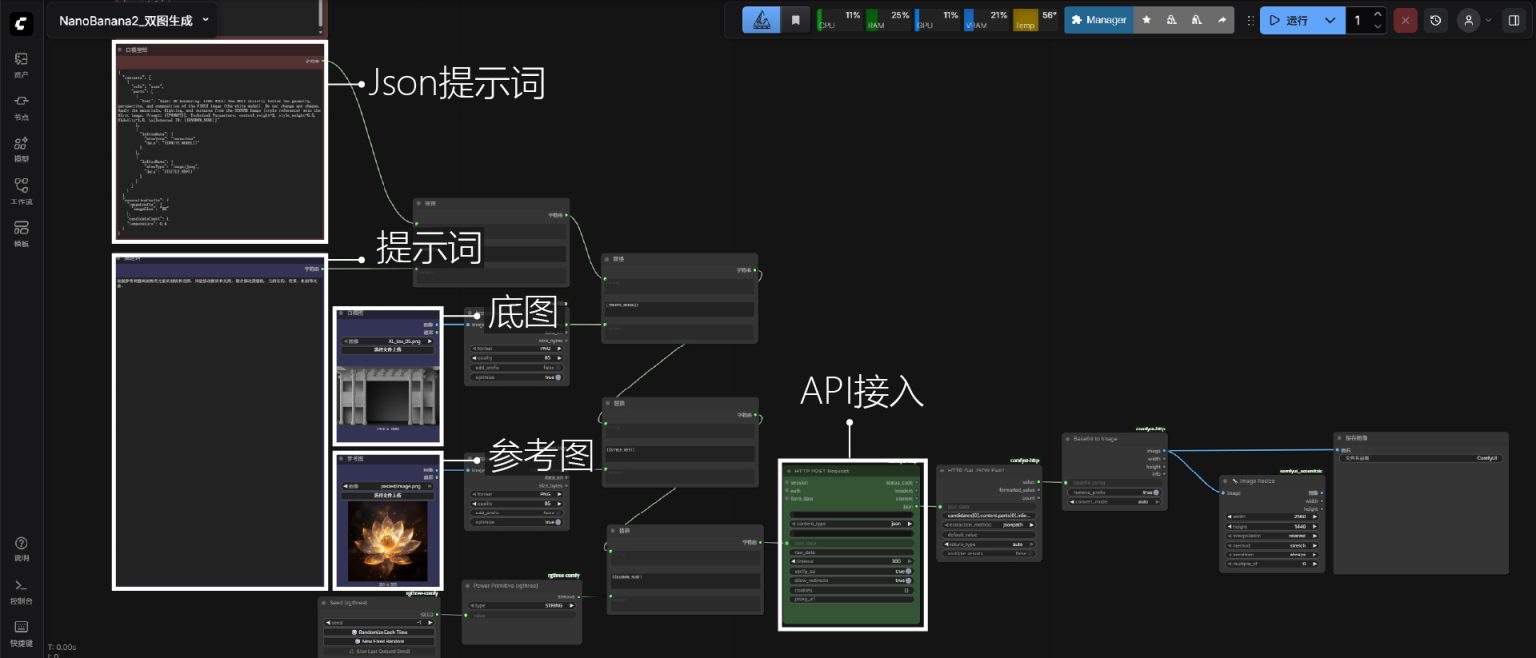
Its workflow core nodes: 1. Json code; 2. Prompt; 3. Base image; 4. Reference image
- Json code: Model prerequisite.
- Prompt: Natural language prompt.
- Base image: The image to be modified.
- Reference image: The style to achieve.
First is the workflow screenshot:
Json code (white model rendering):
{
“contents”: [
{
“role”: “user”,
“parts”: [
{
“text”: “Task: 3D Rendering. CORE RULE: You MUST strictly follow the geometry, perspective, and composition of the FIRST image (the white model). Do not change any shapes. Apply the materials, lighting, and textures from the SECOND image (style reference) onto the first image. Prompt: {{PROMPT}}. Technical Parameters: control_weight=2, style_weight=0.5, fidelity=1.0. \n[Internal ID: {{RANDOM_NUM}}]”
},
{
“inlineData”: {
“mimeType”: “image/png”,
“data”: “{{WHITE_MODEL}}”
}
},
{
“inlineData”: {
“mimeType”: “image/jpeg”,
“data”: “{{STYLE_REF}}”
}
}
]
}
],
“generationConfig”: {
“imageConfig”: {
“imageSize”: “2K”
},
“candidateCount”: 1,
“temperature”: 0.4
}
}
The screenshot illustrates that, compared to traditional open-source image generation models, building a workflow through API integration is remarkably straightforward. Since the actual generation process doesn't occur locally, there is absolutely no computational power demand on the machine. Moreover, the cost is extremely affordable—generating a single 2K image costs around 0.1 RMB. This allows the workflow to achieve batch production without affecting my foreground software usage, as it consumes no local computational resources. I can simultaneously carry out pre-production tasks such as post-compositing and 3D modeling.
The prompt compatibility of NanoBanana2 with natural language is exceptionally good. With the assistance of JSON, adding restrictive vocabulary is almost entirely unnecessary. This enables me to precisely generate the desired output using only a short prompt segment, resulting in very high efficiency. At the same time, this workflow is merely a basic application; subsequently, it can even be directly connected to a preparedSeedance2.0 node (as mentioned in another one of my technical sharing articles), achieving a fully automated AI image-to-video generation workflow. Naturally, it can be further expanded based on specific requirements—for example, I also built an additional workflow that directly extracts keyframes from videos, making it convenient for displaying keyframes of my works on a website.
In summary, I highly recommend trying to use ComfyUI workflows to drive proprietary AI models. Although existing options likethird-party sites such as Tapnow have integrated workflow patterns, their creative costs are unfriendly for individual creators (extremely expensive! QAQ). However, with the help of AI, the learning curve for ComfyUI is, at least for me, not steep at all.
After all, the era of laboriously grinding through tutorials is over!
(End)
